
Cobra Help

Application-Level Security

Application-level security pertains to menu items that are secured based solely on the user’s Primary Role in EPM Security Administrator or PPM Administrator. If a Primary Role is not defined for a user, Cobra uses the access rights defined for the DEFAULT role in EPM Security Administrator or PPM Administrator to secure a menu item.
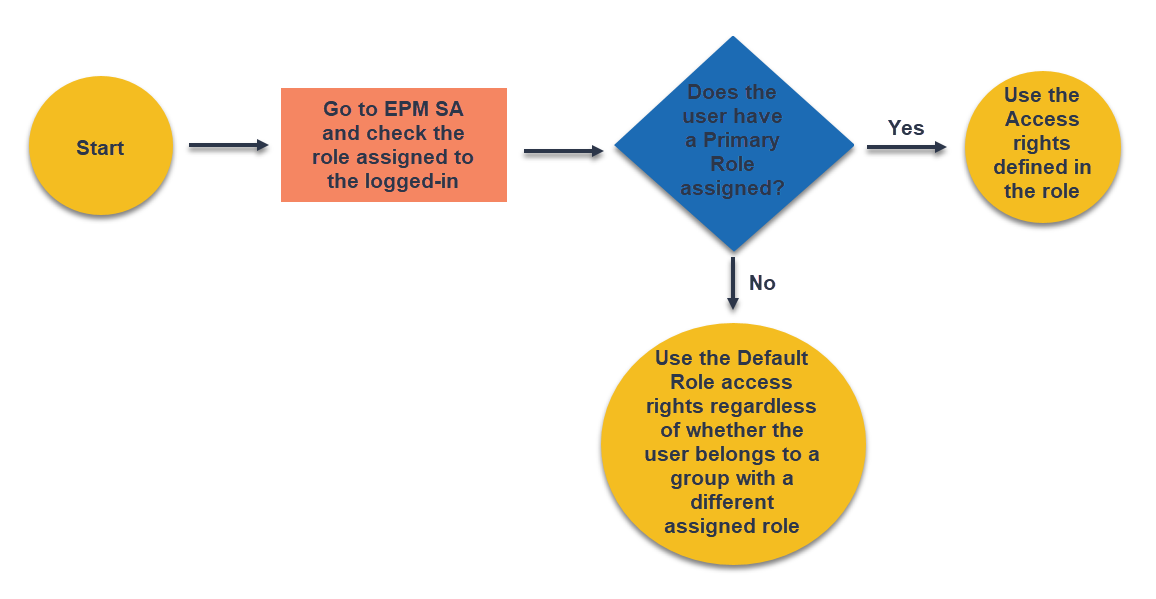
This diagram illustrates how Cobra implements the application-level security.

This section lists the menu items secured at the application level. The items are grouped based on the Cobra ribbon tab where they are located.

FieldDescription
Integration Tab
  • Schedule Integration (Open Plan, MS Project, Primavera, File)
  • Actual Costs Integration
  • Ancillary Data Integration
  • Apportionment Integration
  • Configuration Security
  • Cost Data Export
  • wInsight Export (XML/UNCEFACT)
Reporting Tab
  • Items under Reports Group (Run Report, Report Wizard, Recent Reports, Delete Report)

    Note: This also requires displaying either the All Reports or Personal Reports view before enabling.

  • Calculated Results
  • Items under Batch Reports Group (Add, Copy, and Edit Batch Report)

    Note: This also requires displaying the Batch Reports view before enabling.

Tools Tab
  • Align Time-phased Dates
  • Zero-Out Data
  • Update Codes
  • Calculated Fields
  • SQL Command Utility
  • Process Logs

Parent Topic:

Enabling and Disabling of Cobra Menu Items